
Catalogue app
School timetable
The solver proposes, the school decides. It picks the room too, keeps lab blocks whole, honours co-teaching, leaves classes no gaps in their day, and never makes a teacher change site from one hour to the next — and it can be stopped while keeping the best result found so far.
The app travels inside the link: it opens in your browser and stays there. No account, nothing to install, and none of your data passes through a server.
The app is written in Italian, for Italian secondary schools and their terminology. Everything below describes what it does.
What it does
Ten pages that follow the work as it is actually done in September — and one, the last, that gets opened every morning of the year.
Start seeds a fictional but coherent school — two tracks across two sites, 6 classes, 13 teachers, 11 rooms including three labs and two gyms, 13 subjects, 66 assignments over 180 weekly hours — so Generate can be pressed on the first run to see what comes out, instead of having to enter a whole register first.
Registers and Assignments are the tables everyone knows, with a little more: classes carry their headcount, their site and how many hours they may do in one day; rooms their type, their capacity in pupils and how many classes fit at once, because a gym split down the middle holds two; teachers their unavailable days, their daily ceiling and floor, how many days they may come in at all, and whether they teach first period; subjects their teaching weight from 0 to 10, how to split their hours across the days, a daily maximum, and which subjects may not share a day with them. Assignments point at the real rows of those registers, so renaming a class breaks nothing.
Data is where a school starts when it is already written down somewhere, which
it almost always is. The four registers and the assignments import from a CSV or an
Excel sheet: the page lists the columns each sheet must have and says which collection
it goes into, because importing into the wrong one is the single way to lose the work
already done. Assignments are written by name — 3B, Maths, Rinaldi — and the
rebuild translates them into the internal identifiers, since the ids are known to the
app and not to the office’s spreadsheet. A row that does not resolve stays out and is
listed with the reason, rather than going in and then vanishing from the timetable with
nothing to explain it. The other way round, every collection downloads as CSV or Excel,
and one block builds the sheet usually meant to be sent to somebody: the whole
timetable ordered by class, day and hour, with the day spelled out and the teacher’s
full name.
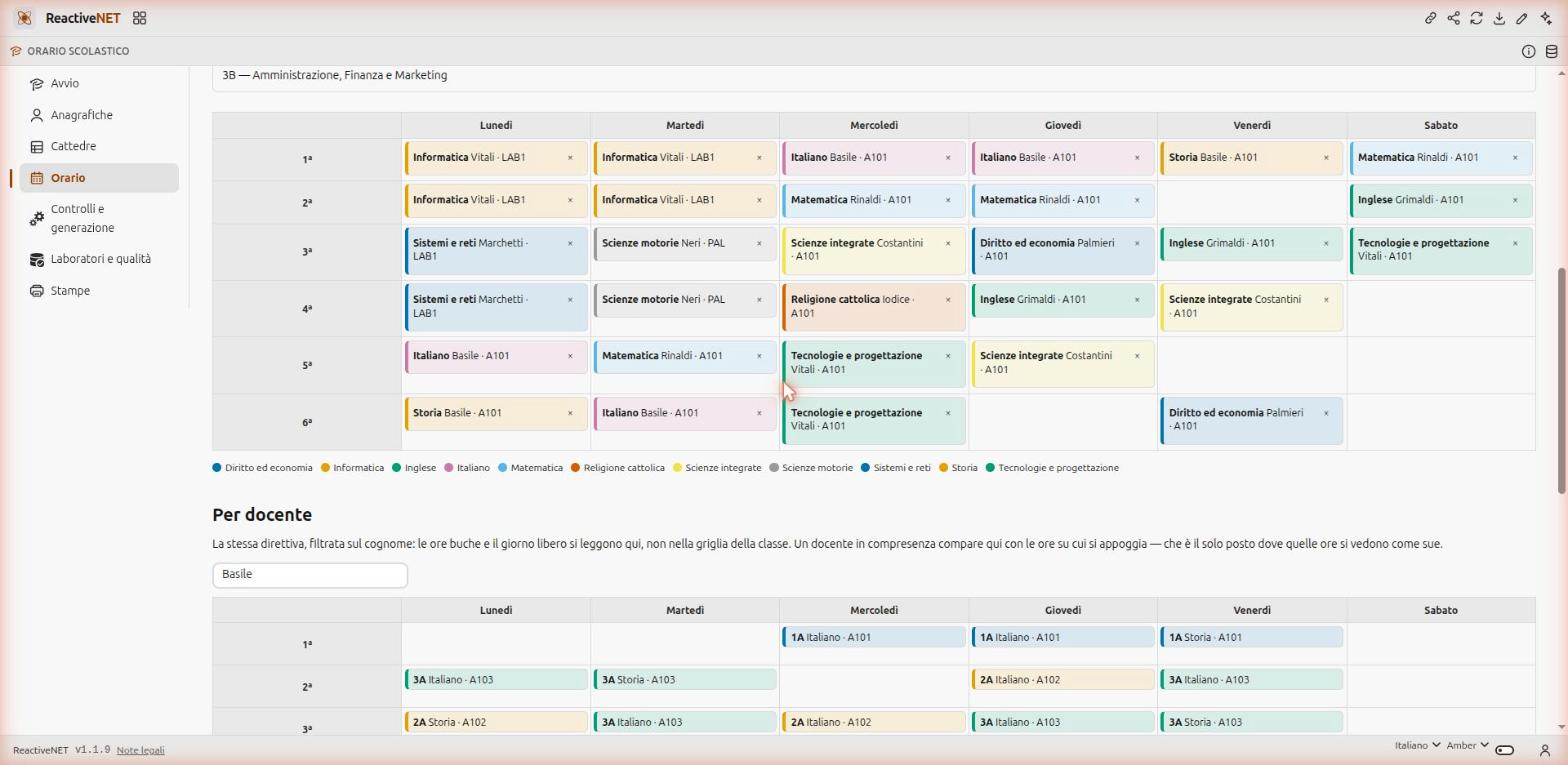
Timetable is the same grid seen three ways — by class, by teacher, by room — because they are the same directive with a different filter. A lesson moves by dragging it, and the drop writes the day and the hour together. Pinned lessons do not drag. Closed cells — the school’s own unavailability, the class’s, the days a teacher is not on duty, the first period they do not teach — show up before you try to put anything in them, and each says why.
Checks and generation is the heart of it. The check finds the hard clashes — a teacher in two places at one hour, a class with two lessons, a room booked twice, a forbidden cell, a day off violated, contracted hours that do not add up — and writes them into a collection the grid reads: clashing cells show up in the grid itself, not in a separate report.
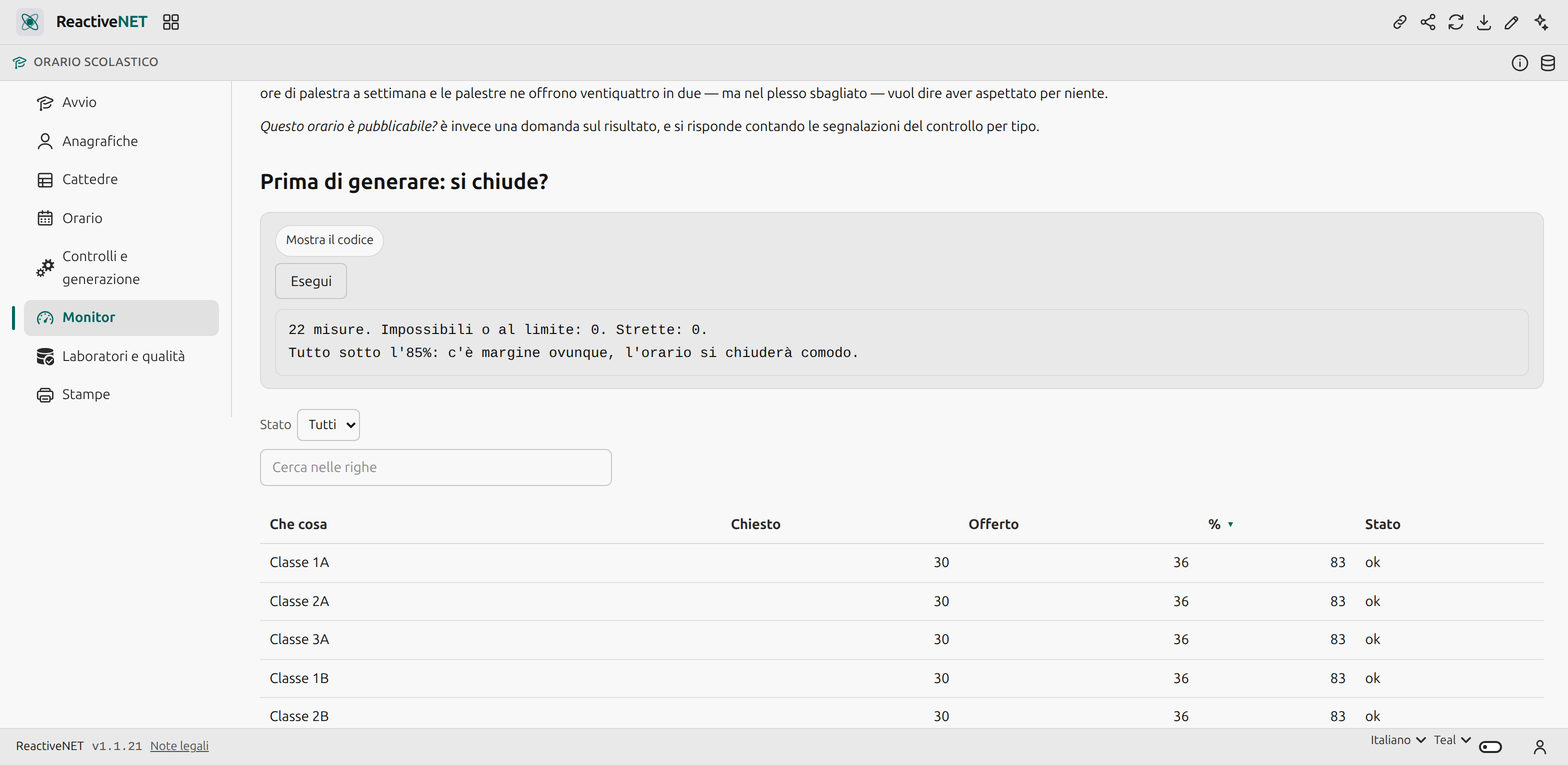
Monitor answers two questions, and the first one is asked before generating. Can this timetable exist? is a question about the registers, not about the timetable: you answer it by counting the hours each class, each teacher and each type of room has to carry against the cells they have. Waiting for the generator to discover that the gyms are not enough is waiting for nothing. Beside it sits the least obvious count and the one that saves the most time: how many teachers asked for the same day off — a personal preference, but their sum is a collective constraint, and if nine out of thirteen ask for Saturday it is not the preference that is lost, it is the timetable that will not close. The second question — can it be published? — counts the checker’s findings by kind.
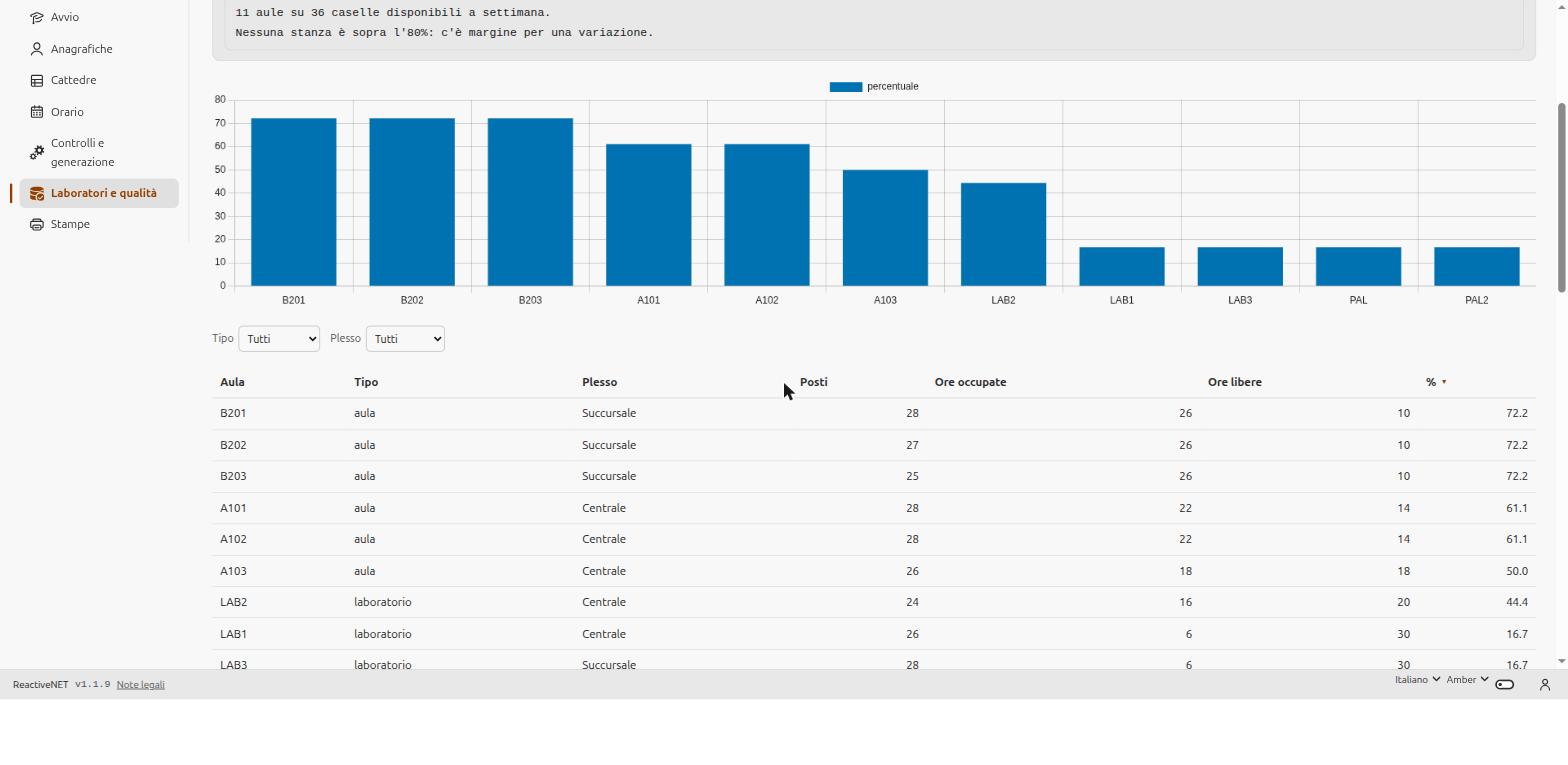
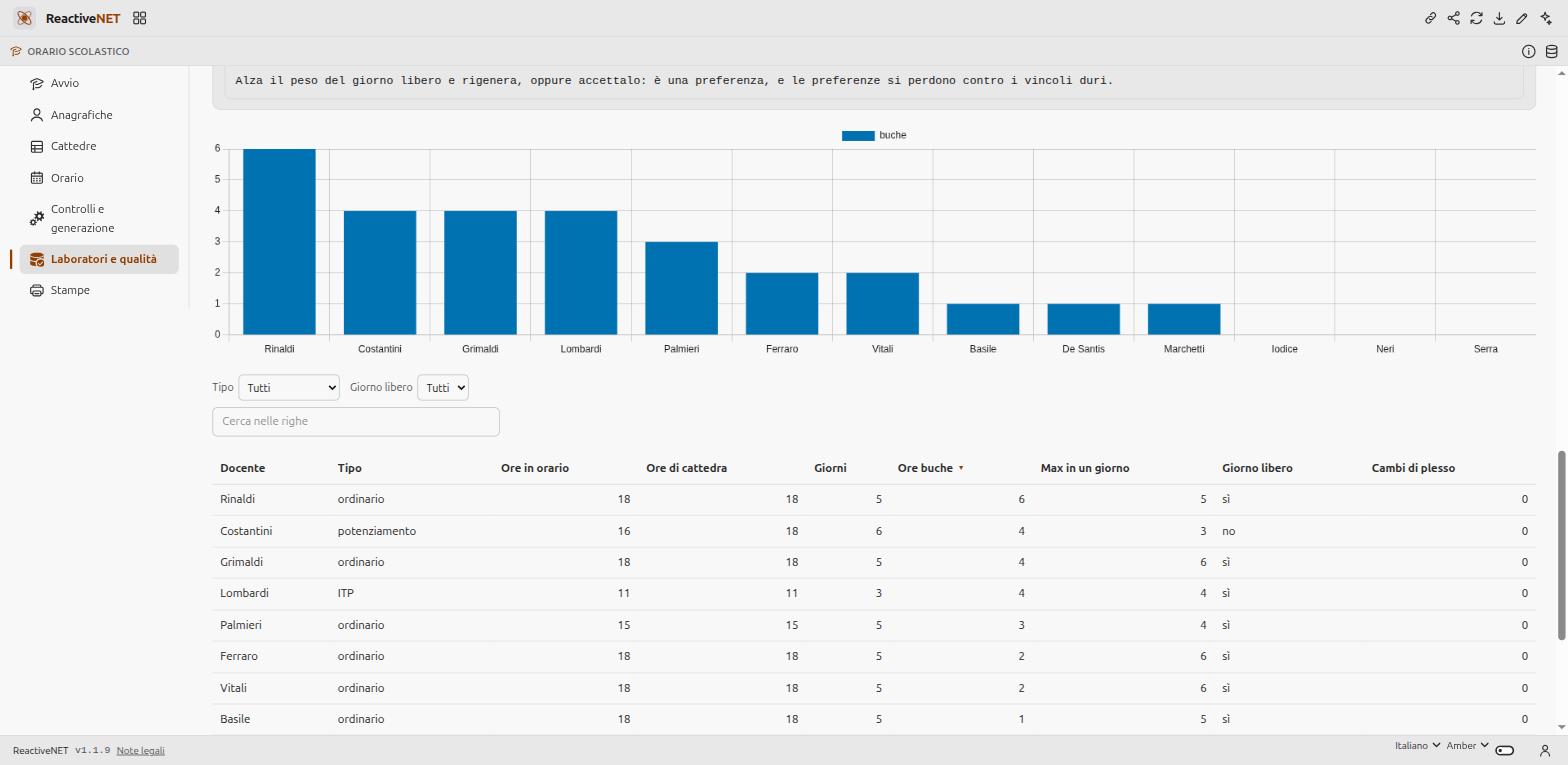
Labs and quality measures what a timetable is actually worth: how saturated the special rooms are, how many free periods each teacher has, who got the day off they asked for, and who changes site during the day.
Printing produces one page per class and one per teacher in a single go, plus a single one per room — in landscape, because a six-day by six-hour grid does not fit in portrait. And two prints that take everything in at once: the wall chart, every class on a single sheet with the subject and the teacher’s initials in each cell, and the list of hours on call, which is what you need on the first day somebody is off.
Cover is the only page you open once the timetable is finished, and it is the one used most: the others are needed three or four times a year, this one every morning. You record who is away — the day, and the hours if it is not the whole day — and the uncovered lessons appear by themselves, each with its candidates in order: first whoever is already in that class as a co-teacher, then whoever is on call and happens to be in the building between two of their own lessons, then whoever would have to come in early or stay late, and finally overtime — and at equal standing it calls whoever has done fewest so far. That count is the point: it is the number that makes a phone call defensible in a staff meeting, and it is precisely the one nobody keeps, because keeping it by hand is tedious. Whoever gets assigned disappears from the candidates for the other classes uncovered in that same hour, whoever is absent is never proposed as anybody’s substitute, and at the end you print the day’s sheet.
The app proposes and does not decide: the first name on the list is a proposal, and stays one until a person records the cover. Whoever is on the phone knows things that are written nowhere in the timetable.
Gaps in a class’s day, which is the most important new thing
In an Italian school an empty period in the middle of a class’s morning is not a quality defect: it is thirty teenagers in a corridor, and a timetable that has them does not get published. It used to happen here and nothing counted it. Now generation ends with a compaction that slides each day’s hours up until they touch, one block at a time, and if one will not fit that day is left as it was — a compaction that breaks a hard constraint to close a gap has made the timetable worse, not better. Improvement and compaction alternate over three rounds, because each unblocks the other. What is left is reported by the monitor, and on the sample school nothing is.
The rules between subjects
Rules between subjects. The teaching weight from 0 to 10 decides how early a subject
sits in the day — a flag can only say «early», and between one hour of religion and four
of maths what is needed is an order. The distribution says how to split the hours across
days (2+1+1 is four hours over three days, one of them double) and adapts where an
assignment has a different number of hours, instead of being discarded. And three hard
constraints on the class’s day: a subject’s daily maximum, subjects that may not share a
day, and subjects to keep on non-consecutive days.
Rooms, blocks and co-teaching
It picks the room. A subject asks for a type — classroom, lab, gym — and the generator finds which one is free in that cell, big enough for that class and on the right site. Adding a second lab is, in this app, how you give a timetable that will not close some air.
It keeps blocks whole. Lab work happens in two consecutive hours, and a block either fits whole or does not fit: it is never split to save a preference.
It puts two teachers in one cell. Support teaching follows the class, the technical-practical teacher works alongside the subject teacher: those are co-teaching, and the second teacher’s constraints bind during placement, not afterwards.
And one constraint that does not show on paper: no teacher changes site from one hour to the next. It is the first thing to break in reality, and the first thing this version enforces.
How well it works
The generator was run on the sample school: 180 of 180 hours placed in 150 blocks, zero clashes, no gaps in any class’s day, contracted hours adding up for all 65 assignments, 202 lessons of which 22 co-taught, every lab and gym hour as a whole two-hour block, 33 free periods across the whole week for 13 teachers. Also run with one constraint switched off at a time, to know what each costs: with four «daily maximum» rules instead of two, five hours were left with nowhere to go — and none of those four rules had been asked for by anyone, which is why the sample declares two. Also tried with bans and pre-assignments, and with deliberately wrong drags to check that the checker sees them all. The browser’s result is identical to CPython’s on the same machine.
What it does not do, and says so inside
It is not a commercial product and does not pretend to be. It does not talk to the ministry’s systems, does not appoint supply teachers and knows nothing about contracts — how many overtime hours anyone may be asked for is the school’s business, not the app’s — does not guarantee an optimum and may leave hours unplaced. Lessons are not edited from a form: they are dragged, deleted, or pinned from the pre-assignments — which is also how the work gets done from a phone, where dragging does not exist.
There is one constraint of the language this app explains rather than hides: a compute block rewrites the whole collection it writes to, so every collection has exactly one owner. The registers filled in by hand — or imported from a sheet — live in a collection of their own, and the block merges them with the sample ones keeping their identifiers, so the assignments pointing at them stay valid. The Start page says it in a table: who writes what. It is also why an import has to go into the right collection, and why the Data page does not mention that out of mere caution.
How to change it
Six hours a day instead of six and a half, no Saturday, a constraint one school needs and another does not: each is a one-line change, and the generator’s code is right there to read, in Python, inside the document.
Yours to change
An app is a Markdown document: open it, edit it by hand, or ask the assistant to change it for you. Whatever you add stays on your device.